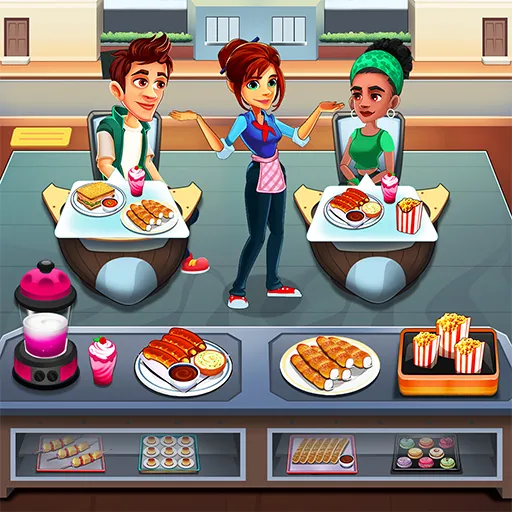
In Cooking Cafe Food Chef, each level follows a clear service flow:
- When customers arrive, tap an empty table to seat them. They’ll browse the menu and wave when ready to order.
- Tap the table to take the order. The requested dishes appear above the table, and a timer bar starts counting down.
- Pick up food from the counter at the bottom of the screen, then tap the customer’s table to serve.
- If you grab the wrong dish, throw it into the trash. You can carry up to 2 dishes at the start.
- As levels progress, more customers arrive, including 2–3 person tables, requiring smart seating and order planning.
As your café grows, you’ll unlock a variety of dishes across four main categories:
- Main Dishes – Burgers, lobster, and more, cooked by the chef and placed on the counter.
- Snacks – Fries, popcorn chicken, and other quick bites, stored on trays with unlimited servings.
- Drinks – Coffee, soda, and beverages made by machines. Only one drink at a time initially, with short cooldowns.
- Desserts – Waffles, ice cream, and sweets made using specific machines that take time to prepare.
Power-Ups & Boosts
Completing levels earns coins, which can be used to buy powerful upgrades:
- Fast Cook (1200 coins): Doubles the cooking speed of chefs, machines, and manual preparation.
- Double Wait Time (2000 coins): Doubles customer patience time.
- 4 Dish Pickup (1500 coins): Lets you carry up to 4 dishes at once.
- Coffee Upgrade (1200 coins): Allows the coffee machine to prepare two drinks simultaneously.
Game Controls
Mouse Click – All interactions
In Cooking Cafe Food Chef, your main goal is to manage seating and time efficiently while serving every customer before their patience runs out. Progress through levels to unlock new tables, expand your menu, and build a thriving food business loved by everyone.
 Tap to play, no download needed
 Tap to play, no download needed
 Tap to play, no download needed
 Tap to play, no download needed
 Tap to play, no download needed
 Tap to play, no download needed
 Tap to play, no download needed
 Tap to play, no download needed
 Tap to play, no download needed
 Tap to play, no download needed
 Tap to play, no download needed